Create a New Post

Search First
Before you create a post, search Community to see if people are already talking about what you want to know. Keeping conversations in existing threads makes it easier for everyone to find answers and information. You can find instructions to help you do this in our Searching Topics and Posts article.
New Post
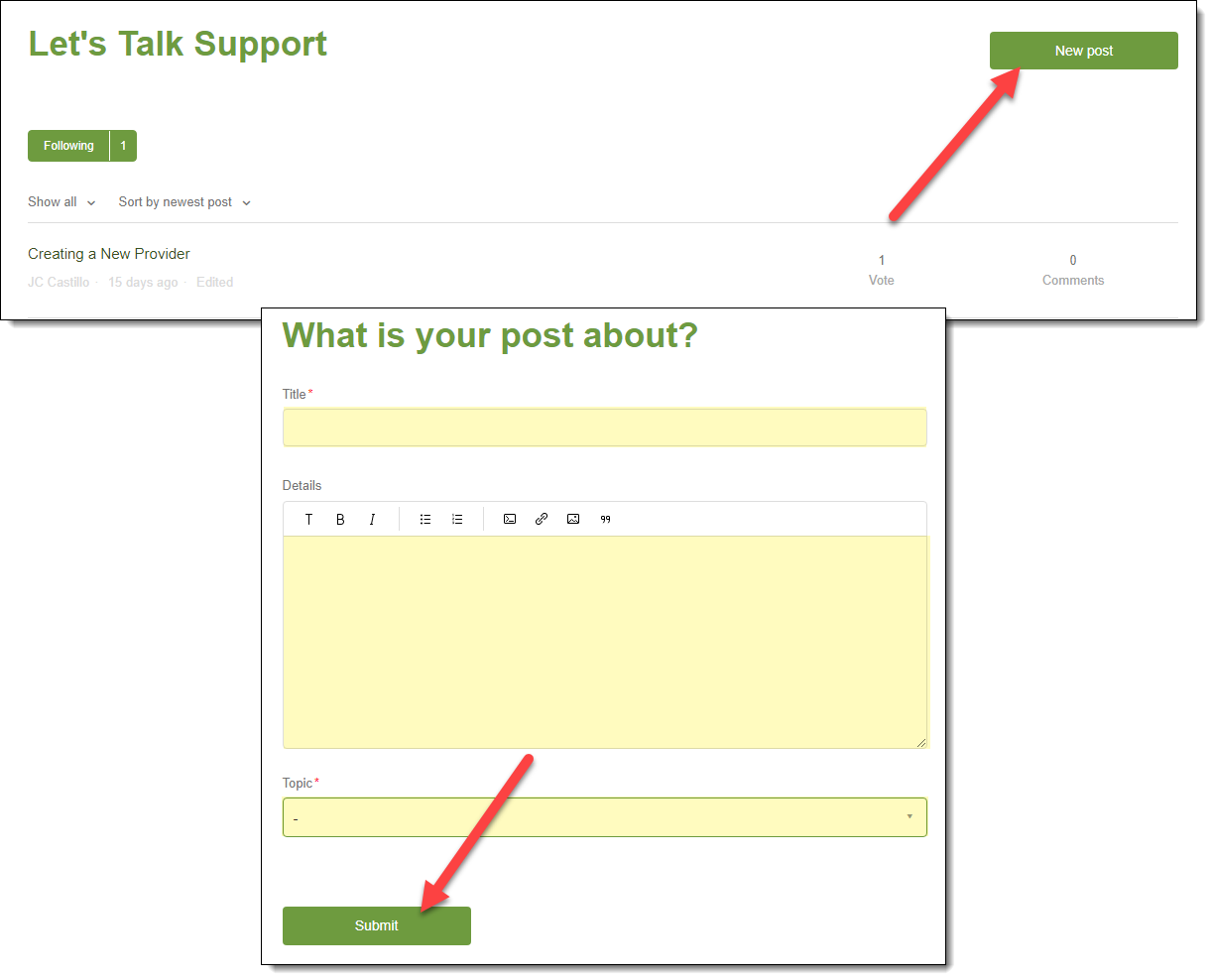
If you do not see the question or suggestion that you want to discuss when you search the Community, you can create your own post. Here's how you can do that:
- Log in to Community.
- Click the New post button.
- In the Title box, type the title of your post.
Tip: Make sure the title is brief, easy to understand, and makes it clear what kind of information you are looking for. - In the Details box, type the body of your post including all of the details needed to fully understand your question or suggestion.
- Click the Topic box, and then select the name of the topic that most accurately describes your post. For example, if you have questions about how to use a feature, Let's Talk Support might be the best topic to select.
- Click the Submit button. Your post will be submitted to one of our Community moderators, and it will be posted as soon as it is reviewed unless it contains inappropriate or offensive content.
Please sign in to leave a comment.
Comments
0 comments